
Panduan Lengkap Membuat Website dengan Hugo dan Tailwind CSS 2026
Panduan Lengkap Membuat Website dengan Hugo dan Tailwind CSS 2026
Membuat website modern di tahun 2026 tidak harus rumit. Dengan kombinasi Hugo sebagai static site generator dan Tailwind CSS sebagai framework CSS, Anda bisa membangun website yang cepat, responsif, dan SEO-friendly dalam waktu singkat.
Apa itu Hugo dan Mengapa Menggunakannya?
Hugo adalah static site generator yang ditulis dalam bahasa Go. Kecepatan build yang luar biasa menjadi keunggulan utama Hugo dibandingkan generator lain seperti Jekyll atau Gatsby. Hugo mampu membangun ribuan halaman dalam hitungan detik saja.
Keunggulan Hugo:
- Kecepatan ekstrem: Build 1000+ halaman dalam <1 detik
- Single binary: Satu file executable, tidak perlu dependensi runtime
- Templating powerful: Menggunakan Go templates dengan syntax yang bersih
- Live reload: Auto-refresh browser saat development
- Built-in features: Taxonomies, RSS, i18n, image processing

Instalasi Hugo dan Setup Project
Langkah 1: Instalasi Hugo
# macOS dengan Homebrew
brew install hugo

# Windows dengan Chocolatey
choco install hugo-extended

# Linux (Ubuntu/Debian)
sudo apt-get install hugo

# Verifikasi instalasi
hugo version
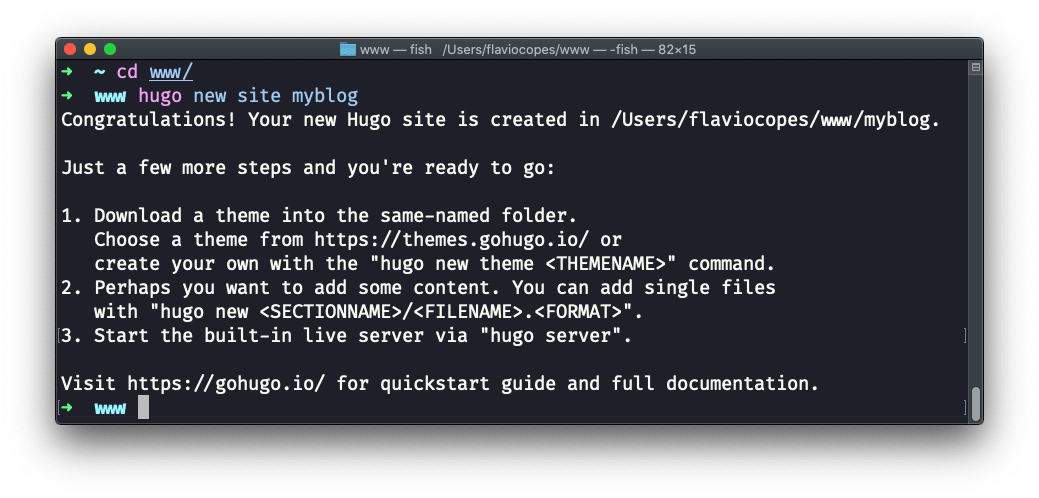
Langkah 2: Membuat Site Baru
# Buat site baru
hugo new site my-website
cd my-website

# Inisialisasi git
git init

# Tambahkan theme (contoh menggunakan PaperMod)
git submodule add https://github.com/adityatelange/hugo-PaperMod.git themes/PaperMod
Langkah 3: Konfigurasi Dasar
Edit file hugo.toml:
baseURL = 'https://www.example.com'
languageCode = 'id'
title = 'Website Hugo Saya'
theme = 'PaperMod'

[params]
  author = 'Nama Anda'
  description = 'Deskripsi website'

[menu]
  [[menu.main]]
    name = 'Home'
    url = '/'
    weight = 10
  [[menu.main]]
    name = 'Posts'
    url = '/posts/'
    weight = 20
Integrasi Tailwind CSS dengan Hugo
Tailwind CSS adalah utility-first CSS framework yang sangat cocok untuk Hugo karena hasil build yang kecil dan performa yang optimal.
Setup Tailwind CSS
1. Inisialisasi Project Node.js
npm init -y
npm install -D tailwindcss postcss autoprefixer
npx tailwindcss init -p
2. Konfigurasi Tailwind
File tailwind.config.js:
/** @type {import('tailwindcss').Config} */
module.exports = {
  content: [
    "./layouts/**/*.html",
    "./content/**/*.md",
    "./assets/**/*.js",
  ],
  theme: {
    extend: {
      colors: {
        primary: '#3b82f6',
        secondary: '#64748b',
      },
    },
  },
  plugins: [],
}
3. Setup PostCSS
File postcss.config.js:
module.exports = {
  plugins: {
    tailwindcss: {},
    autoprefixer: {},
  }
}
4. Buat File CSS
File assets/css/main.css:
@tailwind base;
@tailwind components;
@tailwind utilities;

@layer base {
  body {
    @apply antialiased text-gray-900 bg-white;
  }
}

@layer components {
  .prose-custom {
    @apply prose prose-lg max-w-none;
  }
}

5. Integrasi dengan Hugo Template
File layouts/partials/head.html:
<head>
  <meta charset="utf-8">
  <meta name="viewport" content="width=device-width, initial-scale=1">
  <title>{{ .Title }} | {{ .Site.Title }}</title>

  {{ $css := resources.Get "css/main.css" }}
  {{ $css = $css | resources.PostCSS }}
  {{ if hugo.IsProduction }}
    {{ $css = $css | resources.Minify | resources.Fingerprint }}
  {{ end }}
  <link rel="stylesheet" href="{{ $css.RelPermalink }}">
</head>
Membuat Konten dengan Hugo
Struktur Konten
content/
├── _index.md          # Halaman utama section
├── posts/
│   ├── _index.md
│   ├── post-1.md
│   └── post-2.md
├── about.md
└── kontak.md
Membuat Post Baru
# Buat post baru
hugo new content posts/panduan-hugo.md
File content/posts/panduan-hugo.md:
---
title: "Judul Post"
date: 2026-02-03T10:00:00+07:00
draft: false
tags: ["hugo", "tutorial"]
categories: ["web development"]
---

Isi konten post di sini...
Development dan Build
Mode Development
# Jalankan server development
hugo server -D

# Dengan bind external
hugo server -D --bind 0.0.0.0

# Dengan TLS (https)
hugo server --tlsAuto
Build untuk Production
# Build production
hugo --minify

# Build dengan baseURL tertentu
hugo --baseURL https://www.example.com

# Build untuk debugging
hugo --templateMetrics
Tips Optimasi SEO
1. Meta Tags
Tambahkan di layouts/partials/head.html:
<!-- SEO Meta Tags -->
<meta name="description" content="{{ .Description | default .Site.Params.description }}">
<meta name="author" content="{{ .Site.Params.author }}">

<!-- Open Graph -->
<meta property="og:title" content="{{ .Title }}">
<meta property="og:description" content="{{ .Description }}">
<meta property="og:type" content="{{ if .IsPage }}article{{ else }}website{{ end }}">
<meta property="og:url" content="{{ .Permalink }}">
<meta property="og:image" content="{{ .Params.image | absURL }}">

<!-- Twitter Card -->
<meta name="twitter:card" content="summary_large_image">
<meta name="twitter:title" content="{{ .Title }}">
<meta name="twitter:description" content="{{ .Description }}">
2. Structured Data (Schema.org)
<script type="application/ld+json">
{
  "@context": "https://schema.org",
  "@type": "Article",
  "headline": "{{ .Title }}",
  "datePublished": "{{ .Date.Format "2006-01-02T15:04:05Z07:00" }}",
  "author": {
    "@type": "Person",
    "name": "{{ .Site.Params.author }}"
  }
}
</script>
3. Optimasi Gambar
Hugo memiliki image processing built-in:
{{ $image := .Resources.GetMatch .Params.image }}
{{ $resized := $image.Resize "800x webp" }}
<img src="{{ $resized.RelPermalink }}"
     alt="{{ .Title }}"
     loading="lazy"
     width="{{ $resized.Width }}"
     height="{{ $resized.Height }}">
Deployment ke Cloudflare Pages
Setup Repository GitHub
git add .
git commit -m "Initial Hugo site with Tailwind"
git remote add origin https://github.com/username/repo.git
git push -u origin main
Konfigurasi Cloudflare Pages
- Login ke Cloudflare Dashboard
- Pilih Pages > Create a project
- Connect GitHub repository
- Setup build configuration:
- Build command:
hugo --minify - Build output:
public - Root directory:
/
- Build command:
File wrangler.toml:
name = "my-hugo-site"
compatibility_date = "2026-02-03"

[build]
command = "hugo --minify"
Troubleshooting Umum
Error: PostCSS tidak bekerja
Solusi: Pastikan Hugo Extended terinstall:
# Check version
hugo version  # Harus ada kata "extended"

# Install Hugo Extended jika belum
# macOS
brew install hugo

# Windows
choco install hugo-extended
Error: Build lambat
Optimasi:
- Gunakan
hugo server --disableFastRenderuntuk development - Batasi jumlah content yang di-render dengan
--buildDrafts - Optimasi images dengan caching
Tailwind CSS tidak ter-apply
Cek:
- Pastikan
contentditailwind.config.jsmencakup path yang benar - Jalankan
hugo serversetelah setup Tailwind - Clear browser cache (Ctrl+Shift+R)
Kesimpulan
Kombinasi Hugo dan Tailwind CSS adalah pilihan terbaik untuk membuat website static yang modern, cepat, dan SEO-friendly di tahun 2026. Dengan panduan ini, Anda sudah bisa membuat website dari nol hingga deployment.
Keunggulan utama:
- Build time yang sangat cepat (<1 detik untuk 1000+ halaman)
- CSS yang ter-optimize secara otomatis
- SEO built-in dengan struktur yang baik
- Deployment mudah ke berbagai platform hosting
Mulailah dengan project kecil dan eksplor fitur-fitur Hugo secara bertahap. Komunitas Hugo sangat aktif dan dokumentasi sangat lengkap untuk membantu Anda.
Artikel Terkait
Link Postingan : https://www.tirinfo.com/panduan-lengkap-hugo-tailwind-css-2026/